Thursday, August 9, 2012

Droid Gallery App Using a Lot of Data? 3 Potential Culprits.


With unlimited data plans becoming a thing of the past, monitoring mobile data usage is now a necessity. Every MB counts. One potential bandwidth drain on Android phones is the Gallery app, whose data usage has perplexed users on several forums.

If your Gallery app seems to be using an excessive amount of data relative to how often you use it, check the following:

Note: You can view data usage by going to settings &get; data usage.

Another note: I’m using a Galaxy Nexus, so the steps I describe may be slightly different depending on your device or Android version.

Turn off Google Photos Sync
Google Photos sync is enabled by default. This process syncs the photos on Picasa with your mobile galleries.
To turn this setting off:

1.    Open the Gallery app on your droid
2.    Click the menu icon in the upper right hand corner (on the Galaxy Nexus, anyways; may be different for other devices) and select “settings”
3.    Under “account settings” you will need to click where it says “Google photos sync is ON”
4.    Click on your email account
5.    Scroll down to “Sync Google Photos” and remove the check
6.    Repeat these steps for any other Google account you have setup on your phone. When you go back to your Gallery settings you should see “Google photos sync is OFF”
 Disable Google Plus Instant Upload
Google Plus instant upload allows your mobile images and videos to be instantly shared on the social networking site. While it isn’t 100% clear whether this process uses bandwidth under the Gallery app, disabling it ensures no data is used at all.

To turn it off:
1.    Open the Google Plus app
2.    Click the menu icon in the upper right hand corner and select “settings”
3.    Under “Photos and Videos” click on “Instant Upload” (if it’s marked “on”)
4.    Scroll to and select your Google account
5.    Remove the check next to “Sync Instant Upload”

Be Mindful of Streaming Videos

If you stream a movie using the default Gallery Player, this bandwidth is attributed to the Gallery app. Many users expect that data to show under Browser or elsewhere, but that isn’t the case.

These are the three Gallery bandwidth uses that I have come across. If there are more that I am missing, or if you have other tips on reducing data usage, please share in the comments.

About the Author:Gere Jordan is a web designer and web marketer at Continental Message Solution, a leading provider of US based customer service and call center outsourcing services.

Best Features of iPhone.

iPhone, the most trending mobile device nowadays,  is a magical smartphone that enjoys the luck  of being so much required worldwide. It is a unique generation of smartphones which has its specific features and specifications that ensure its highest rank in the market of mobile technology. There are 5 generations of iPhone: iPhone, iPhone 3G, iPhone 3GS, iPhone4, iPhone 4S. The line of iPhones is rumored to be soon accomplished with iPhone 5, which is expected to come some months later, it is possible in in the end of this year. The new coming iPhone will certainly bring some new features that will differentiate itself from the previous 5 versions. So, before the iPhone 5 release date comes and hits the web with rumors and discussions, let's learn about the features of the previous versions. 
iPhone is like a computer that you can place in your pocket like any mobile device. All the versions of iPhone somehow differ one from another. All the versions of iPhone have one similar specification: that is the 3.5 inch retina display with multi- touch technology which allows using one and more fingers at the same time to work on the screen. iPhone 4, in advance to the previous models, includes 2 cameras, retina display with higher resolution. As it was mentioned above, iPhone is like a small computer. It has features that a computer has though it doesn't mean that its phone features suffer from it. So, what are the main specific features that iPhone has. First of all its phone features that contain visual voicemail, texting, voice dial. As any other good smartphone iPhone as well has high- quality email features. Let's agree that iPhone is a perfect choice for video playback with its 3.5 inch retina display. The other feature is the feature of cameras; Apple has recently made an innovation dealing with this feature. In comparison with previous versions of iPhone, iPhone 4 includes 2 cameras. iPhone differs with its thinner frame, TFT touchscreen, 3.5 inch retina display, 320 x 480 pixels, multitouch, it is protected with corning gorilla glass. Apple iPhone has GPRS, EDGE, WLAN – WiFi 802.11 b/g, Bluetooth, USB, 2 MP, 1600 x 1200 pixels camera. The iPhone is featured with its liquid contact indicators which turn red as they have a contact with liquid. By the way, to cut short, iPhone has all the features that will satisfy even the strictest customer.
Bio: Hi everyone, my name is Roman and I am a guest blogger having years of experience in this sphere. I mainly write articles about iphone unlock uk and I do hope you will like them.   

New Way of Handwrite on touchscreen for Google Search.

All the people want to do their task in easy with fast method but with convenient but not difficult either its using at the time on touchscreen mobile or Tablet. At this time we feels very difficult to type on a touchscreen device, especially when we are on to go. But no worry from now to use that because Google has introduced us : Hand write on web search for mobile phones and tablets.

We will say that this is Cool and Useful feature. Although Google search by Voice is more useful and convenient than writing, there are lot of certain situations where writing is more practical such as in a noisy pub or on way. Google Handwrite allows you to perform your searches by just writing letters, numbers, symbols or characters on touchscreen of your device with your fingers.

Google has enabled Handwrite for iOS5+ devices, Android 2.3+ phones and Android 4.0+ tablets. It’s available in more than 27 languages.

For more you can see on by Video :--


Wednesday, August 8, 2012

Download YouTube Videos by using PWN in url.

All the users of YouTube want to download the video that they feel like downloading it for future reference. Now you’ll either open your slow YouTube videos downloader software or search for an alternate solution for downloading the videos. Last time I also posted an article regarding how to download YouTube videos but that method is very easy than that. Always we used download managers software like IDM (Internet Download Manager), Orbit, and other effectively with Flashgot plugin for Firefox. But if we have Google Chrome or Opera or Safari users, then these download manager will not work for you. You can find a lot of extension for chrome to download YouTube videos like YouTube Center. But for others you have to use web services like KeepVid and SaveVid. I think I covered all the common tricks people use for downloading YouTube videos. This doesn’t stop from us finding new ways to do a task. One suck trick which is quite simple for everyone to perform and it can be used on any browser. The trick is called as PWN trick. Don’t worry about what it means; you just need to paste it in your browser address to download videos without a need of software. 

Below this trick, follow these simple steps
:-

Open the video which you want to view in your browser.
Click on your browser address bar; enter the letter ‘PWN’ (without quotes of course) before ‘YouTube’ and right after ‘www’, and simple press Enter.
Now you’ll be presented with a list of services like SaveVid, KeepVid, ClipNabber, and more for downloading both video and audio. Choose any of the services to download the video.

After clicking on any of the services, choose the format and quality of the video which you want to download and your work is done.

Note :- You may need JavaScript to be installed on your system. Also allow the JavaScript to run for downloading.

Monday, August 6, 2012

Facebook popularity in India comparison with other countries.

In present Era, Facebook has become the most popular social media site in India. With more than 31 million active users (as of August 2011), India trails only the United States and Indonesia in global usage. This has surpassed the orkut (social networking site by Google) users, which was the most popular before 2010. Nevertheless, Facebook has conquered the social media networking in India, just as it has in almost all countries now.
As per the latest report by Experian down the curtain, how much time people living in different countries spend on Facebook. Singapore users topped the chart, with US at the 5th position India at the 7th position. Brazil users spent only less than half the average time spent by Singapore. The high average minutes spent on Facebook provides an opportunity for firms to gain greater sales and engagement through content and advertising. The key finding of this study also inferred that India experienced the fastest growth in Facebook use over the past year, with the social network accounting for an increase in market share of 88% year on year (YOY) in August 2011 whereas US  experienced a market share increase from Facebook of 5% YOY.
         Countries           Average time spent on Facebook in August 2011 per session
  • Singapore           38 mins 46 sec
  • New Zealand      30 mins 31 sec
  • Australia             26 mins 27 sec
  • UK                    25 mins 33 sec
  • US                     20 mins 46 sec
  • France               21 mins 53 sec
  • India                  20 mins 21 sec
  • Brazil                 18 mins 19 sec
At present India is the 3rd most country with 100 million internet users after China (485 million) and US (245 million). As per one of the recent surveys made by Google, the usage of internet in India would be increased triple by 2014. I think by that time India may surpass US in terms of number of internet users. Another interesting factor is that Indian users are not using Facebook during work hours (Penn Olson, 2010). I feel this is one of the reasons, that in spite India being the 2nd most densely populated country in the world, still has less usage of Facebook than US.
Around 350 million of the active users currently are accessing Facebook through their mobile devices around the world. Approximately 3 of 5 smartphone users in US access social networking websites/Facebook whereas in India the mobile phones are used the most to access Facebook. The average cost of smartphones is also high in India than US. Same is the case with iPad’s. Therefore, I believe that increase in use of smartphones and iPad’s in India would also increase the Facebook users and its usage. Also, there is a huge potential for content and advertising markets in India to capture user’s attention and to enhance the marketing through better engagement in social networks. 

Wednesday, August 1, 2012

How to add Gmail in Outlook 2013 via POP ?

Lot of people using Gmail account always but on net If anyone wants to use his/her gmail account on outlook for checking mails without open gmail so for that are the steps which are as follows :- 

POP is enabled by default. In Outlook 2013, setting up a POP Gmail account couldn’t be easier.
By default, Gmail uses POP protocol, if you’ve changed it to IMAP, go into Gmail Settings and verify Pop is enabled and IMAP is disabled.
Launch Outlook and click the File tab. Then click the Add Account button on the right.
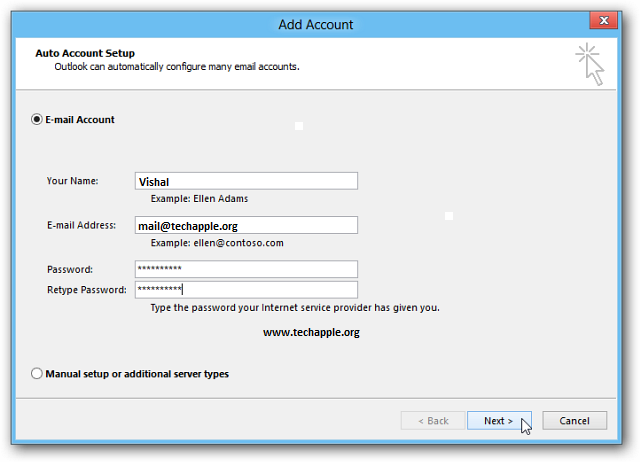
The Add Account wizard comes up. Enter in your name, email address and password twice, then click Next.
Outlook will verify your settings and complete the process of setting up your account. Click Finish.
Now you can send and receive email from you Gmail account through Outlook.

Twitter Delicious Facebook Digg Stumbleupon Favorites More