Showing posts with label Tools. Show all posts

Tuesday, September 18, 2012

Backstit.ch,name of same functions like iGoogle startpage.

Nice to first look in personal start page of Backstit.ch which launched today as a public beta. It looks basically aims to fill the gap in iGoogle which will be leaving once Google retires the service on November 1, 2013. It will compete with established services such as Netvibes or My Yahoo, so let’s see what it has to offer right now.
Today when I used to enter signed up to get started creating your own personal start page on the Internet, or skip that and used all of the features the service is currently making available. A click on catalog on the left displays the various modules that the service is making available.

There are various version concentrates on related to social networking, photos, news and shopping related service modules that we can add to use on start page.
• News: A collection of popular news sites, including New York Times, Yahoo! News or NBC News, as well as tech blogs such as Mashable, TechCrunch or Engadget.
• Social: concentrates on FacebookTwitter and LinkedIn, with options to see updates, posts and various other account related or public information posted on those sites.
• Shopping: Groupon, Woot and a handful of other deals related sites are available with lot of options.
• Photos: Facebook, Instagram, Twitter, and photos shared on Tumblr can be added to the start page.

Each module that you add to the start page comes with configuration options. News for instance can be filtered with use of lot of categories according to interest wise in and words that the news need to contain.
Backstit.ch is currently a beta product and as such likely not feature complete. It is currently missing features that I’d expect a start page service to offer, including:
• Import of opml files
• Sharing options
• Custom tabs
• Widgets or gadgets like weather reports, calculator, currency converter
• Internet search

Friday, July 27, 2012

12 ways to save on software purchase.

In the computer era each and every people wants to buy software in an easy manner but it is very difficult for judging that from where you are buying the software that is not scam or not because scam is a way that anyone can easily cheat you. So,Always check whether you can save money on buying software online. Most software companies provide coupons at a rate of 15-50% and sometimes more. You just need to look for them. Sometimes you should choose few programs equal in functioning and buy the one with a coupon. Below you will find a few trusted services and ways to save money.
1. www.bitsdujour.com One of the largest software discounters. The site’s chip is that it provides software at substantial discounts, where each deal is available usually for one day only. At this resource you can found some very comprehensible discounts on a number of interesting software. It doesn't process the sales; it just arranges the discounts and provides the links. You buy the program right from its vendor. Everything it features is a legal, current version of the product.
2. www.retailmenot.com/coupons/software Great universal discounter with a separate software category. It has a very positive moment – you can add your own discount, which is then promptly checked by moderators. At the site there is a considerable number of products from well known developers.
3. www.softcns.com More than 50k positions. Good categorization of types and brands. There are both permanent and transitory positions. (Products, items)
4. www.pricecrumbler.com  The service is relatively young, but it is spinning up. More than 34k positions. Good division on categories. The most interesting items are brought to the home page that greatly simplifies the search for you.
5. www.thesoftwareclub.com Another service with a large number of positions divided on brands and categories. Top items are brought to the home page. It is also distinguished by the presence of exclusive discounts.
6. www.freesharewaredepot.com The software discounter with the possibility of software and coupon codes submission. They also have top positions and Editor's Picks.
7. www.giveawayoftheday.com This service stands apart from others since it is not a matter of discounts. At the daily basis they post licensed programs that will be available for download free of charge within 24 hours. Not a demo version, but a licensed registered version.
8. Try open source alternatives. But there are nuances - as a rule such software is less convenient (except for the most popular products), has a limited functional or does not have sufficient documentation. Often license agreement tells that such products should not be used for commercial use. You can spend significantly much more time to solve problems. But it’s worth a try. Just use the word “open source” in the search.
9. Find freeware. To be realistic - there are no really free things on the web. Especially it stands for software. The "free" software usually contains adware, toolbar installers and other crapware. It’s legally, because the installation adware has been indicated in the license but we all know how carefully the license agreements are read. Of course, there are a lot of pleasant exceptions. Anyway - be aware. Sometimes you can just avoid installation of toolbars by disabling the checkboxes during the installation process, but in some cases you need to spend a lot of time digging deeply rooted adware from your system. Often the freeware is the limited version of the commercial program, and it serves to promote the full commercial version.
10. www.couponcabin.com Another major universal software discounter with a separate category for the software. The site has a large database of coupons for a wide arrangement of online retailers. The majority of the coupons they list are verified and guaranteed to work, but they do list user-submitted coupons and promo code that may or may not work. Not very convenient because there is no division on categories.
11.Never buy so called "OEM software", if you see Windows or Adobe products (usually - old versions) with approximately 60-80% off price or less - be sure it's a scam. http://graphicssoft.about.com/cs/faq/a/softwarescams.htm
12. When purchasing multiple licenses or expensive software with no coupon codes, always contact the vendor and ask for discount. In addition to discounts, you will be able to realize how easy and effective communication and support are.

Friday, July 20, 2012

Recycling PCs and other Gadgets.


As if it were not enough that the planet is groaning under generations of refuse, we have electronic waste to add to the whole mess.  Here are some numbers for you to crunch on your calculator.

80% Americans just chuck their gadgets in the rubbish. Every DAY 130, 000 computers are thrown away and 75% of all computers sold is considered surplus. In America, that means hazardous waste to the tune of up to 40 million computers. And that is just computers. Add about 350,000 cell phones to the mix and you might begin to sense the magnitude of the problem. When it comes to recycling, only a mere 15% of electronic gadgets and equipment ever get there.  

If we treat electronic waste like ordinary waste, one of two things could happen- it is burnt or it is sent to a landfill as garbage. When it is the former, it releases poisonous gases into the air and when it is the latter, it slowly releases toxic substances like mercury, lead and cadmium into the water, soil and atmosphere. In both cases, the consequences are scary to even contemplate. Recycling gadgets is such big business that regions build their businesses around it. For instance, Guiyu is known as China’s Electronic Waste Village, and around 5,500 businesses dismantle devices close to the tune of 1.5 million pounds each year, generating $75 million a year in revenue.  But the thriving industry is not contained to this part of the world alone. It is huge business in Africa and India where, unlike the West, recycling is run as a small business and guidelines are often ignored.  In fact, lead poisoning is a threat in places like these.  Other health hazards include cancer and miscarriages.

Recycling is crucial because it produces raw material for more gadgets. Also, you can find copper, lead, gold, silver and other metals that can be further reused. The good news is that awareness is increasing and so are opportunities. For instance, Dell and Staples have come together for a recycling initiative- if you do not want to ship your old stuff to the computer firm, just drop it off at one of the stationery giant’s stores. You could sell your old, still-working phone to Greenphone.com that will then help poor customers procure phones. In the U.S, your phone could be part of a care package for troops abroad with Operation Gratitude or to fund programs that fight domestic violence.

Electronics giant Sony has take-back programs, and Kodak has a buy-back program for its printers and cameras. Gazelle.com will give you money for your mobile phones and Macs, among other gadgets. Apple has a recycling program where you get an Apple Gift Card for money on your Apple devices, depending on their condition.

Recycling also brings out the creative side of things- you can choose among recycled circuit boards desk lamp, jewelry made with your keyboard keys, and a chair that takes PlayStation2 consoles for a smooth ride. Other wonders include ties, laptop sleeves and clocks.

So, next time on, recycle that gadget and let the planet breathe a little easy.

This article has been brought to you by Onlinecomcast.com a site that offers savings and current information on Comcast cable and internet. Visit us www.acquiweb.com to see great deals.

Saturday, July 14, 2012

Amazon launches GameCircle Network for Kindle Smartphone.

Amazon is taking on Apple’s Game Center with the launch of its own gaming network for Kindle Fire gamers: GameCircle.

GameCircle brings achievements, leaderboards and — most interestingly — makes sync APIs accessible for Kindle Fire games. Sync will save your place to the cloud, allowing you to pick up playing on one device right where you left off on another.
Amazon describes lot of features like as “Players will not have to worry about losing progress, scores or achievements between Kindle Fire devices, as all data is securely stored in the cloud. “Probably the only reason for having such a service — unless you happen to have bought multiple Kindle Fire tablets — is if those hints of an Amazon smartphone are for real.
Sure, you could also use the feature to transfer game progress on your current Kindle Fire to the next generation if and when that becomes available, or to a new Kindle Fire if your current device is lost, stolen, or broken. The functionality; however, would lose its luster long-term if you didn’t have a few Fire devices to use it with.
As far as the other GameCircle features go, the Achievements section keeps track of all of the trophies, awards, treasures, and badges that you’ve earned in a game without having to leave the game much like Apple’s Game Center.
Players can get messages in-game, letting them know when they’re reached a new milestone, and can pause gameplay to check out a summary of all of the achievements they’ve unlocked so far as well as what achievements are left to be unlocked.
Leaderboards let players see how they stack up against others playing the game.
If you’re a developer, you can sign up for access to GameCircle APIs here. Gamers can check out a list of Kindle Fire games that are already using GameCircle services here.

Tuesday, June 26, 2012

Another Simplest way to Download YouTube Videos.

Lot of times, I was thinking that how we can download the YouTube Videos but always got no ways to gets the videos for download. I have found few tricks for me or in the past to help our readers to download YouTube videos. The tricks are still working perfect, but one needs you to install an additional third party tool or use a web service to generate the download link before you can actually download YouTube videos.
If you want to save these videos from YouTube, we have got a great way to downloadthese videos and all that with on your browser.

Downloading YouTube Videos

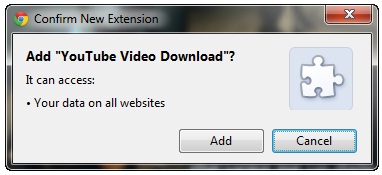
1. Download YouTube Video Download script from userscript.org on your browser and install it. Chrome users can directly download and install the script on their respective browser. Firefox users need to install a GreaseMonkey add-on before they install the script. Opera also supports user scripts but you need to install them manually.
2. After you have successfully installed the script restart your browser. The script will integrate seamlessly into YouTube, and you will notice no change in your browser.

3. Now open the YouTube page you want to download the browser form. 
If you installed the script correctly you will see a Download button below the video next to Add to and Share button. 
Simply click the Download button and select the quality of video you want to download
The video will now start downloading in the selected format. After the download is complete, you can play it on your default media player.

Monday, June 18, 2012

How can we freeup disk space with Clean Temporary Places ?

New temporary file cleaner system which is to differs from CCleaner. CCleaner is one of the best tools in the temporary file cleaning software and that every other application that gets created in the niche should be compared to it to answer the simple question why one should use it instead of CCleaner.
When we looks at Clean Temporary Files, all will immediately notice that it does not support as many locations as CCleaner, even if CCleaner Enhancer is not taken into consideration. And while you can add custom folders to the program that you want to clean up, it would mean lots of work to add all the locations manually to the application.
Clean Temporary places on the other hand ships with features that CCleaner does not ship with. This includes statistics about the cleanup history, displayed as a graph, and as total, maximum and previous values. And unlike CCleaner, Clean Temporary Files ships with networking support that network administrators can make use of to clean files on connected systems (CCleaner’s Network Edition offers the same functionality at a price).
It takes two clicks to clean up all the locations though, and while it lacks several locations that you may want to include in cleanup operations, it covers important locations by default. Another are where it lacks is support for Registry cleanups.

Thursday, June 14, 2012

How to unlock folders locked by the folder lock software without any password?

Why should we lock a folder?

In normal level each and every person needs security either its of personal PC or other. For PC needs password for security, some important folders also need to be locked for security. And if we lock our folder we will have following benefits:-

·         Unknown persons can’t be able to open that holder, and use the files inside it.
·         Only you and the persons who know the password can use the files inside it.
How to lock a folder using folder lock software
Requirements:-
To lock a folder by using folder lock software you need:-
·         A folder which will be locked.
·         A, folder locking software should be installed on your PC, like Folder Access.
Download from the following link :-
http://www.topdownloads.net/software/view.php?id=156290
How to lock
When you start the folder access for the first time you will be asked the password to set. This password will be used to gain access to software and for locking and unlocking folders.
To lock a folder after installation, you just right-click on folder and select lock folder.
While locking and unlocking folder, you will asked for the password. Please enter the password you had set when first time you started Folder Access.
How to unlock the locked folder, without password?It happens that sometimes you may forget the password of your locked folder. Or you may want to open that folder and use the files and data inside it, but you don’t know the password. You can’t uninstall that software, because in this process also, it will ask for password.But now you don’t have to worry much about this, because now you can open or unlock that folder without knowing any password. You have to follow simple steps.
Requirements:-To unlock or open any locked folder you need:-
A pen-drive or memory card (with card reader and mobile).A PC in which folder access (or the software by which the folder is locked) is not installed.You can use a mobile phone instead of PC .How To unlock any folder, you have to follow these simple steps:-
1.       Plug in the pen-drive or memory card (with card reader) into the PC (in which locked folder stored).
2.       Copy the locked folder, and paste it into the pen-drive or memory card.
3.       Unplug the pen-drive or memory card.
4.       Plug in the pen-drive into another PC (in which folder lock software is not installed) or (for memory card) plug-in the memory card into mobile phone.
5.       Open the pen-drive or memory card.
6.       Right click on folder and select Rename or (for memory card) select options of that folder and select rename.
7.       Change the coding name of the folder.
8.       Unplug pen-drive from PC,or unplug memory card from mobile. And plug-in into 1st PC (in which folder lock software is installed).
9.       Open the pen-drive OR memory card and see your locked folder will be unlocked.

Monday, June 11, 2012

How to create Passphrases with the help of KeePass?

Passphrases have lot of advantages over conventional passwords that depends on variety of situations. The main relinquished factor between passphrases and passwords is that the former consist of multiple phrases, which are often words. One of the benefits of this method is that it renders the majority of dictionary attacks useless, as unlikely that a phrase like testable Own Test techapple.org. Please would be included in a dictionary attack.
Security can be improved further by adding special characters or numbers, for instance by substituting every third e with 3, or adding a space after the tenth character. But protection against dictionary attacks is not the only benefit that passphrases have. They can also be designed to be more memorable than a random password of the same size.
Even if you are using a password manager like KeePass, you may sometimes want to create passphrases, for instance when you sometimes need the password in situations when you do not have access to KeePass.
KeePass and Passphrases
KeePass ,we can say excellent password manager, and one of its strengths is its extensibility. Word Sequence Generator is the name of the plugin that adds passphrase generation support to KeePass.  All that needs to be done to install the plugin is to download it from the Sourceforge project website and extract its contents into the root KeePass directory. KeePass needs to be restarted if it is already open to pick up the new plugin.
The plugin becomes available in KeePass’ Password Generation Options menu. Just select WordSequence under Generate using custom algorithm, and click on the settings button on the right of the line afterwards to configure it.
Here we can then add words into the dictionary that used to create passphrases. This step is really important, and while you are at it, we can also check out the generation options on the right. Here we can select the count of words for your passphrases, configure substitutions to increase the security of the phrases, add extra characters to the passphrase, and define capitalization options. The newly generated passphrases become then available in the Preview tab.
Exiting the settings returned an error on a 64-bit system of Windows, but did not seem to have an impact on the program itself. The configuration changes were saved after all.


Thursday, June 7, 2012

Mozilla Firefox 13 launched with new features.

Mozilla has released Firefox 13 on Wednesday, which it says is a speedier, safer version of the open source web browser.
But prior upgrade of new , when Firefox users clicked to open a new tab, they saw simply a blank page, unlike browsers such as Chrome, Safari or Internet Explorer, which provide users with links to recently opened or favorite sites. Now, Firefox homepage will feature icons that enable quick access to bookmarks, add-ons , settings, history and downloads. In  addition, when users click for a new tab, they will view thumbnails to their most recently and frequently visited sites.

New Version of  Firefox also boasts a new home page and tab page layout similar to those of competing browsers such as Google's. The new tab experience is also part of an overall redesign that will make the browser faster. Firefox 13 now loads tabs on demand first for the tab that a user is currently viewing, and then the background tabs when they're opened, allowing the browser to start faster.

In another level of potential improvement to speed, New version of Firefox 13 now by default supports the SPDY protocol, which can be speedier than HTTP. Mozilla said it would significantly reduce load times on websites that support SPDY.

The new version will also be available to an additional 15 million people around the world, according to Mozilla, since Firefox 13 supports the Khmer language. The browser now supports more than 85 languages worldwide.Current Firefox users will have an automatic upgrade next time the start the browser.

Tuesday, May 22, 2012

Always keep clean your PC with Wise Disk Cleaner.


In Daily routines internet is need of every people but aware of virus and other infected items by use of CCleaner. Users say that there is not really a need to run disk cleaners like the popular CCleaner or the lesser known FixBee regularly on a system thanks to Terabyte-large hard drives. And while that may be true in some cases, it may not be true for all. Users with Solid State Drives built-in their computer for instance will have a couple hundred Gigabytes tops on that drive available, which can get filled rather quickly with games, large applications, or media.
Wise Disk Cleaner is a free program for the Windows operating system that PC users can make use of to remove unnecessary files from their system that take up disk space. The program uses a clean interface that is divided into three tabs at the top.
The Common Cleaner tab resembles CCleaner’s functionality. It’s basically a list of locations where temporary files or files that leave traces are saved in. A click on a group opens up a detailed selection list. You find the usual file locations listed here, from web browsing cookies and history information to temporary file locations that Windows uses automatically.
The list is nowhere near as comprehensive as that of CCleaner, but it covers many major locations. It needs to be mentioned that only Internet Explorer, Firefox and Google Chrome are covered by the cleaner.
The Advanced Cleaner basically searches select hard drives for temporary file types, invalid shortcuts and empty files, and offers to remove them.  It is possible to add custom file extensions here to have them included in the cleanup automatically from that moment on.
Wise Disk Cleaner offers to run these two cleanup modes manually or on schedule. It is for instance possible to run an automatic cleanup once per week.
The Slimming System options offer interesting options to cut down on the size of the Windows installation folder. Here it is possible to remove components that you may not use at all. This includes Windows Help files, language packs, or the Windows Installer Baseline Cache which usually has quite a large file size.
On a one month old installation of Windows 7, the slimming system option offered to free up 1.3 Gigabyte of disk space.
The program settings offer some interesting options. You can first add folders here that you want emptied regularly. Whatever is in that folder, will be cleaned by the program when you run it. You can furthermore add folders to the list of exclusions; so that they are not targeted by the cleaner at all, and have the program create a one-click shortcut on your system to run cleanups manually with a click on that shortcut. Non-SSD users can furthermore enable secure deletion here to make the data unrecoverable after deletion.

Closing Words

Slimming System feels like a genuine feature, especially since it usually frees up more disk space than the other cleaning options. This feature sets it apart from other cleaners that do not offer it.  Please note that you can download a portable version of the PC cleaner by clicking on the Alternate Download link on the program website.

Saturday, May 19, 2012

WikidPad,a helpful for personal Wiki-like local Notebook.


When we think to store information, we have lots of different options at disposal. All of we can fire up good old Notepad or a comparable text editor and add the information in there, use the advanced options that rich text editors like Microsoft Word or Open Office offer, use special note taking applications or store your notes remotely, for instance on Google Docs or Ever note. But from the end node we can use one from all like as mini dictionary is WikidPad.
WikidPad is a free open-source program for the Windows and Mac operating system, and Linux, that offers a a wiki-like functionality on top of the text editing capabilities that it offers. Probably the biggest feature setting it apart from many of the other solutions that you may come across are those functionalities, and here especially the linking of notes, and the ability to add file and url links as well that you can click on to open the file or website in the default application.
You can create one or multiple wikis for your information, which may consist of one or multiple documents. You are free to fill the documents as you see fit, but need to now that you can only add textual information, including rich text formatting options, directly using the program’s editor. Media can be included as file links pointing to local files.
The program starts in edit mode, which may not be the most appropriate mode to start in as it opens the WikidPad Help wiki in edit mode as well. First thing that you may want to do is switch to preview mode to make the thing more readable. This is done with the shortcut Ctrl-Shift-Space, or a click on Tabs > Toogle Edit / Preview.
When it comes to text formatting options, you have standard options like headings, bold and italic at your disposal, as well as different colors, tables, as well as inline HTML tags and cascading style sheets..
Users unfamiliar with the concept, should read through the introduction over at the official website, as it explains basic concepts like starting a new Wiki, creating an index and additional pages, the formatting options, or how links work in the program.
You can export your wiki at any time to HTML, either as a single HTML file or a set of HTML files which can be interesting if you want to make it available in a local network or on the Internet.
While it is relatively easy to start your own wiki and fill it with contents, you will spend some time finding out how to do things before you get used to the program’s mechanics. This may keep some users away, who would like a simpler solution. If you take your time though, you will find out that it an be quite the powerful tool.
Note :- Some Windows users may need to run the program with administrative privileges after installation

Thursday, May 17, 2012

Create a Unique Password for Every Site You Use.

Learn how you can create unique and strong passwords for every website that you use without storing the passwords anywhere.

Most people thus rely on password management software that encrypt and store all your passwords in a database which is protected by a single password. You enter that master password and you instantly have access to all your stored user logins and passwords.
Every person wants to create lengthy, complicated and unique passwords for every website that you use but that rarely happens in practice because these complex strings would be nearly impossible for anyone to remember.


There’s however another solution as well that will help you generate unique passwords for all your online accounts but without storing the passwords anywhere – neither online nor on your computer. It’s called Password Chameleon.
With Password Chameleon, all you have to do is remember one master password. You enter the site’s domain name (say gmail.com) and your master password (say He!!0WorId) and tool will instantly create a password by mashing these two strings. Every time you enter your master password and the web domain, the tool will generate the same password.
The good thing is that passwords are generated locally on your computer and while all your online accounts will have unique passwords, you will have to remember just one master password. Also, Password Chameleon uses the
 SHA-1 Algorithm to generate your passwords (aka hashes) and it impossible to decrypt the master password from the generated hashes.The downside is that this method isn’t a very practical solution for people who could be maintaining multiple accounts on the same website. The web app and browser extensions are free though the mobile apps cost a little less than $2. 

Article refer from labnol.org

Saturday, May 5, 2012

Add Google Sitemap to your Blogger Blog.

The XML Sitemap file is like a directory of all web pages that exist on your website or blog. Search engines like Google and Bing can use these sitemap files to discover pages on your site that the search bots may have otherwise missed during regular crawling.
The Problem with Blogger Sitemap Files
An complete sitemap file should mention all pages of a site but that’s not the case if your blog is hosted on Blogger.
The default XML sitemap file of any Blogger blog will have only the 26 most recent blog posts – see example. That’s a limitation because some of your older blog pages that are missing in the default XML sitemap file may never get indexed in search engines. There’s however a simple solution to fix this problem.
Generate a Complete Sitemap for your Blogger Blog
This section is valid for both regular Blogger blogs (that use a .blogspot.com address) and also the self-hosted Blogger blogs that use a custom domain (like techapple.org).
Here’s what you need to do to expose your blog’s complete site structure to search engines with the help of an XML sitemap.
1.       Open the Sitemap Generator and type the full address of your blogspot blog (or your self-hosted Blogger blog).
2.      Click the Create Sitemap button and this tool will instantly generate the necessary text for your sitemap. Copy the entire generated text to your clipboard (see screenshot below).
3.      Next go to your Blogger dashboard and under Settings –> Search Preferences, the enable Custom robots.txt option (available in the Crawling and Indexing section). Paste the clipboard text here and save your changes.
And we are done. Search engines will automatically discover your XML sitemap files via the robots.txt file and you don’t have to ping them manually.

Tuesday, May 1, 2012

Users showing their interests in Pinterest ; daily visits double in three months.

Pinterest hasn't had a great deal of development recently except for maybe its user base. According to an infographic by Tamba, a social media company, Pinterest has doubled its daily unique pageviews between January 2012 and March 2012. In January, the number of daily unique visits to the social network was 2 million. In March, it was 4 million. Pinterest exists on iOS but not Android yet, and has been downloaded 2,50,000 times on the Apple mobile OS.Furthermore, 56 percent of Pinterest users are between the ages of 25 and 44. 28 percent of users in both January and March, were between the ages of 25 and 35, and another 28 percent between the ages of 35-44. The majority chunk (42 percent) of Pinterest users exist in the income bracket between $25,000 and $50,000 per year.

What's interesting though is the increasing male population on the social network. Pinterest has been reputed as being primarily a ladies' social network, but it seems that more men might be getting on board (pun intended). In January, 20 percent of Pinterest users were men, which stands women at 80 percent. However, in March, the number of men on Pinterest increased to 28 percent, leaving women at 72 percent. Taking a look at the top 10 user interests on Pinterest, fashion designers and collections come out on top. This is followed by music art and memorabilia and then vineyards and wine tourism. The average time spent on Pinterest per visit is 14.2 minutes and in March 2012, Pinterest had 2.3 billion page views.

A big use of Pinterest is retail. Pinterest links users to websites where they can buy the items that have been 'pinned' and Pinterest is projected to account for 40 percent of all social media driven purchases. Facebook, which is also a place for retailers to bring users to their sites to buy, will account for 60 percent of all social media driven purchases. Buyers referred from Pinterest are 10 percent more likely to buy something as well as spend 10 percent more on average. Pinterest has room for considerable growth, especially with its retail influence as is evident. The question remains whether the social network will stand on its own feet or be swallowed up like Instagram by Facebook. We'll just have to wait and watch. In the meantime, are you Pinteresting?


Thursday, March 29, 2012

Click To Play Plugin Feature in Firefox 14.


Click To Play is a feature that was first integrated into the Opera web browser, before it also became available in Google Chrome. The feature in Opera allows you to enable plugins on demand. When active, certain plugins are not loaded automatically when you visit a page that is trying to interact with the plugins. Instead, you see a big play button that you can click on to start the element on the page that is requesting access to the plugin.

Google Chrome
handles click to play in the same way. If you activate the feature, you see a placeholder on the page that you need to click on to allow the contents to use the plugin it requires for its functionality.

Click to play configuration

Opera: Opera button > Settings > Preferences > Advanced > Content > Enable plug-ins only on demand
GoogleChrome:  Wrench icon > Options > Under The Hood > Content Settings button > Click to play under Plug-ins

Firefox click to play

The latest Nightly Build of the Firefox browser includes a click to play feature of its own. It is currently only available as an about:config parameter, and not integrated into the user interface. If you want to enable it, you need to enter about:config into the browser’s address bar to load the configuration page. Filter for the parameter plugins.click_to_play and double-click it to change its Boolean value from false to true. This activates the new feature in the browser.
Once you have done that you will see a placeholder image whenever an element requires a browser plugin to function properly on a web page.

Twitter Delicious Facebook Digg Stumbleupon Favorites More