Showing posts with label Email. Show all posts

Wednesday, August 1, 2012

How to add Gmail in Outlook 2013 via POP ?

Lot of people using Gmail account always but on net If anyone wants to use his/her gmail account on outlook for checking mails without open gmail so for that are the steps which are as follows :- 

POP is enabled by default. In Outlook 2013, setting up a POP Gmail account couldn’t be easier.
By default, Gmail uses POP protocol, if you’ve changed it to IMAP, go into Gmail Settings and verify Pop is enabled and IMAP is disabled.
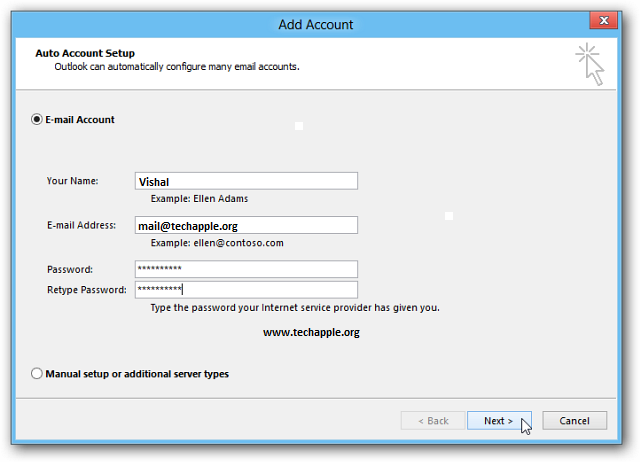
Launch Outlook and click the File tab. Then click the Add Account button on the right.
The Add Account wizard comes up. Enter in your name, email address and password twice, then click Next.
Outlook will verify your settings and complete the process of setting up your account. Click Finish.
Now you can send and receive email from you Gmail account through Outlook.

Friday, June 15, 2012

Microsoft replacing hotmail with Newmail rival to Gmail.

I was shocked when i heard about that Microsoft is launching the Hotmail new emails, The world’s biggest email service Hotmail which is strike to be resemblance to Gmail like in its design.
Hotmail is still the biggest email provider in the world with some 360 million users, but Gmail has caught up with 350 million, shooting up from just 260 million users last October.This Newmail will be in clean look when it comes out to front that has been used for the related stories.

Tile-style icons make it easy to flick between Mail,Contacts, Calendar and SkyDrive for cloud storage. There are some blank spaces though, hinting there could be more features on the way. According to Win Future, there's a mysterious vertical bar you can't see in the screenshot too.

Newmail service will also linked to our Facebook and Twitter accounts and will allow users to keep their contacts automatically in sync and see what their friends are doing on the service.
Newmail however, appears to be just the title for the service and users will still have @hotmail email addresses. But there's no word on when we'll see an official release, but I think it's reasonable to expect it around the same time Windows8 gets kicked out the door, so sometime around October.

Thursday, March 22, 2012

How to check an email address actually exists or not ?

We know Internet is now ruled by a different kind of communication, we still use to reply on email for several reasons and yes it is also one of the most convenient way to transfer the information. But email address is not easy like Twitter and Facebook to authenticate; but other instance we can’t confirm whether it is genuine or fake easily. I got some useful tools to check whether an email addresses actually exits or not, you can see them below. Tool I tried is Verify Email Address and it is quite awesome. This will be really useful for newbies.

  1. Email Address Verified This means the email address is correct. They checked the email address syntax and also whether the mail server is working properly or not.
  2.  Email Address Is Not Valid Here the information says the email address “……@example.com” was not created by the administrator, but has a mail server configured using Google Apps and the email syntax is correct. So the email address is not valid or available.
  3. No MX Resource Records are Found MX (Mail exchange) Record is an entry in a domain name database that identifies the mail server that is responsible for handling e-mails for that domain name. Here the MX Resource Records are not found, so probably they might not have configured any mail server for sending and receiving mails. So any email address with “____@example.com” may not be valid.
   4. Invalid Email Address Syntax Normally an email address will look like “name@example.com”, but the one mentioned here is not, so obviously it is an invalid email address.
What Really Happens Behind? These screenshots gave simple explanation, what really happens is quite Geeky; you can check the process below.
Log:
Get MX for gmail.com... OK.
Connect to gmail-smtp-in.l.google.com... OK
= 220 mx.google.com ESMTP h5si1627720qcd.7
> EHLO email-verifier.net
= 250-mx.google.com at your service, [209.160.72.213]
250-SIZE 35882577
250-8BITMIME
250-STARTTLS
250 ENHANCEDSTATUSCODES
> MAIL FROM: <info@email-verifier.net>
= 250 2.1.0 OK h5si1627720qcd.7
> RCPT TO: <............@example.com>
= 250 2.1.5 OK h5si1627720qcd.7
> QUIT

Geeky? Simple Explanation Here.
1. First they get MX DNS records of the domain name to verify which mail server are used.
2. Then they check the mail server to see whether the username really exists.
3. After verifying with the email syntax and all, the results displayed.
That’s it, no big issues. Meanwhile you can also check out similar tools like Verify Email Tool and Verify Email.

Saturday, March 17, 2012

How to remove an email Address in Gmail ?

All people use have an unique identity either Gmail or other, but in Gmail remembers two different types of addresses. First  and most obvious, are your contacts--the people, companies, and organizations that you have intentionally added to your address book. The other addresses are those that you've sent email to but never entered as a contact.


But it can also be a problem. You start typing in a friend's name and up come two addresses--the one from your contact list and a dead one you haven't intentionally used in years. And you pick the wrong one.
So how do you delete a contact that isn't really one of your contacts? By pretending that you're about to turn it into one:
Click Gmail in the upper-left corner of the Gmail Web page, then Contacts from the pull-down menu.
Start typing the name or address in the search field. When the unwanted address appears, select it.
This will bring up the page where you can turn this person into a real contact. You can add or change the name, address, a birthday, and even a photo.
But that's not what you're here for. Instead, pull down the More menu near the top of the window and select Delete contact.
It's possible that if you start typing the name into a message's To field immediately, it will still come up. But if you wait a couple of minutes, it won't. And it won't ever again.
There is one variant to this: When you select the name, you might find that the unwanted address is one of several for a real contact whom you want to keep. You just want to get rid of that particular address.
In that case, don't select Delete Contact. Just click inside the unwanted address field, press CTRL-a to select the entire address, then press DELETE.

Thursday, March 1, 2012

Gmail backup can be taken by lot of ways.


All people uses Gmail either they involves by personally or business terms but backup of mails are most important part of right way in life which is so important. In same Gmail is something that we never think about backing up, because we always assume that our data is safe. That well known more than  40,000 people would tell you it isn’t that safe due to their being a data issue that wiped out all of their Gmail data last March.
It’s my default that bugs are part of the IT industry and Google isn’t exempt from bugs happening to them. Even Google taking all the backups structure of their servers, but if will take your own backup of your emails that will be a good idea to save your required which is more useful.
There are 7 ways you can backup your Gmail account:-
Gmail-Backup is free software available from gmail-backup.com or from the Google Apps marketplace. Gmail-Backup uses the IMAP option to backup your mails.
Using to create another Gmail Account
Lot of people are well using that facility by creating a Gmail account which is free and importing  all mails to it easy, so this allows you to use another Gmail account as your backup. This isn’t perfectly safe, as you won’t know where the two mailboxes are on their servers, but Google does roll out updates in phases, so it is less likely for both to get hit at once.
Using a Desktop Client
All major operating systems ship with a default email client of their own and backing up data using this option also helps you view your mails at any time even without being connected to the internet. Some of the good alternatives are Microsoft Outlook, Apple mail and Mozilla Thunderbird.
Mailstore can access multiple online email accounts using the POP/IMAP methods and create backups for your emails.
Hotmail may not be the most preferred email solution, but it still clocks in around more than 350+ million users worldwide. Hotmail in its approach to make things easier for people wanting to join their bandwagon has partnered with trueswitch.
TrueSwitch, normally a paid service, lets users copy their mails from one account to another, but it is free if you are moving from one email service to Hotmail. So you can backup your emails to Hotmail and still keep using your gmail account.
For a one-time cost of $19.95, Gmail Keeper offers a robust solution specific to Gmail which includes backing up your folders; including labels and the trash folder into a .zip file on your computer. It also gives you the option to backup multiple accounts.
Backupify can backup all kinds of online services like Gmail, Google Docs, Picasa, Flickr and more. The advantage lies in the fact that, once backed up, you can search, download or restore the data at any point. There are 3 kinds of plans. The free plan includes the backing up of up to 5 accounts with a limit on storage to 2GB per account.

Wednesday, February 29, 2012

How to easily search your Contacts, Emails, Docs , Apps and more.. ?

Day to day usage of social and business activities are up by using internet savvyers. It is a big task to search all of our posts and files. I’m not just talking about the ones on your computer. I’m talking about trying to search through all of your mails, documents, tweets, online files around the Internet and all kinds of extra things in relation.
It’s a long process to search each account separately for emails, files or posts. We need to find and identify a way to simplify this searching process. It would be much easier if we could just give one tool access to all of our accounts.
There are two web apps which can help to do this by searching all of your stuff in one place. You need to connect your accounts with the web apps, then you can perform search operations to find what you want to looking for. I have connected all my accounts with the following websites and have tried them out, so I can give you an overview of each.
Cloud Magic


Cloud Magic is a web app that is available for both desktop and mobile. This web app searches all of your things across lots of different websites like Twitter, Gmail, Google Apps, Docs, Calendar and Contacts and brings you the results in one place. The entire service provided by this web app is free. 
First, register an account, and then connect your Twitter, Gmail or Google App accounts, and the associated services with the them like Docs, Contacts, Calendar with it. This will allow you to search the emails, tweets, calendar events, contacts and more for the connected accounts at one place. This web app is available as an extension/add-on for the Firefox and Chrome browsers. After the installation of the Chrome extension, the icon of this is displayed beside the wrench icon on the Chrome browser.


Greplin
is another web app which is available as a Firefox add-on  and Chrome extension. Greplin supports a wide range of applications like Gmail, Google Apps, Facebook, Twitter, Evernote, LinkedIn, Reddit, Yahoo Mail and many more. The Greplin web app isn’t available entirely for free, but the free users can connect Gmail, Google Apps, Facebook, Twitter, Dropbox, LinkedIn, Google Calendar, Google Docs and Google Calendar with this web app.  The services like Evernote, Yammer, Salesforce, Basecampq, Highrise, Campfire, Google reader, Delicious, Reddit, and Yahoo mail are available at the premium rate of $4.99/month

Thursday, December 15, 2011

How to verify an e-mail address?

How do you verify if a given email address is real or fake?

When we send a test mail to that email address and if your message doesn’t bounce, it is safe to assume that the address is real. But some web domains may have configured a catch-all email address meaning that messages addressed to a non-existent mailbox will not be returned to the sender but in most cases, such email messages will bounce.

Ping an Email Address to Validate

When you send an email to someone, the message goes to an SMTP server which then looks for the MX (Mail Exchange) records of the email recipient’s domain.
For instance, when you send an email to test@gmail.com, the mail server will try to find the MX records for the gmail.com domain. If records exist, then next step would be to determine whether that email username (test in our example) is present or not.
Using a similar logic, we can verify an email address from the computer without actually sending a test message. Here’s how:
Let say that we want to verify if the address marshal@gmail.com exists or not?

Step 1.
Enable telnet in Windows.  Or if you already have the Putty utility, skip this step.

Step 2.
Open the command prompt and type the following command:
nslookup –type=mx gmail.com

This command will extract and list the MX records of a domain as shown below. Replace gmail.com with the domain of the email address that you are trying to verify.
gmail.com MX preference=30, exchanger = alt3.gmail-smtp-in.l.google.com
gmail.com MX preference=20, exchanger = alt2.gmail-smtp-in.l.google.com
gmail.com MX preference=5,  exchanger = gmail-smtp-in.l.google.com
gmail.com MX preference=10, exchanger = alt1.gmail-smtp-in.l.google.com
gmail.com MX preference=40, exchanger = alt4.gmail-smtp-in.l.google.com

Step 3.
As you may have noticed, it is not uncommon that we have multiple MX records for a domain. Pick any one of the servers mentioned in the MX records, may be the one with the lowest preference level number (in our example, gmail-smtp-in.l.google.com), and “pretend” to send a test message to that server from you computer.

For that, go to command prompt window and type the following commands in the listed sequence:
3a: Connect to the mail server:
telnet gmail-smtp-in.l.google.com 25
3b: Say byebye to the other server
ByeBye
3c: Identify yourself with some fictitious email address
mail from:<vishaji@gmail.com>
3d: Type the recipient’s email address that you are trying to verify:
rcpt to:<marshal@gmail.com>
The server response for ‘rcpt to’ command will give you an idea whether an email address is valid or not. You’ll get an “OK” if the address exists else it will show 550 error.

Twitter Delicious Facebook Digg Stumbleupon Favorites More